

Running workshops, meetups, classes, or church events? Then you need a clear place on your website where people can see what’s coming up and sign up. A long blog post or a PDF schedule just doesn’t cut it.
That’s exactly what an event calendar plugin fixes. It gives you a proper calendar with dates, venues, maps, and filters. Many of them also let you sell tickets, collect RSVPs, and send reminders, all from your own site.
Keep in mind that an event calendar is not the same as an appointment booking plugin. Events have a fixed date and time with many people attending, like a concert or a webinar. Appointments are one-on-one time slots, like a haircut or a consultation.
That’s why a booking plugin often isn’t the right tool for events. (If you need one for appointments, check out our list of the best WordPress booking plugins.)
In this post, we’ve picked the 9 best WordPress event calendar plugins for all kinds of events, from small local meetups to paid conferences and virtual events. All of them have a free version, and most offer paid upgrades for ticketing and extra features. Let’s dive in.
|
# |
PLUGIN |
FREE VERSION |
RATING |
DETAILS |
|---|---|---|---|---|
|
1 |
The Events Calendar ★ Best overall |
✓ Yes |
★ 4.2/5 WordPress.org · 600K+ installs | |
|
2 |
Events Manager ★ Best free option |
✓ Yes |
★ 4.2/5 WordPress.org · 60K+ installs | |
|
3 |
EventON ★ Best for design |
✓ Yes |
★ 4.4/5 CodeCanyon · 52K+ sales | |
|
4 |
Eventin ★ Best for ticket sales |
✓ Yes |
★ 4.7/5 WordPress.org · 10K+ installs | |
|
5 |
Sugar Calendar ★ Best lightweight option |
✓ Yes |
★ 4.5/5 WordPress.org · 10K+ installs | |
|
6 |
Eventonomy ★ Best for community events |
✓ Yes |
★ 4.8/5 Trustpilot (Wbcom Designs) | |
|
7 |
EventPrime ★ Best budget all-in-one |
✓ Yes |
★ 4.4/5 WordPress.org · 7K+ installs | |
|
8 |
WP Event Manager ★ Best for event listing sites |
✓ Yes |
★ 4.0/5 WordPress.org · 20K+ installs | |
|
9 |
Amelia ★ Best for events and appointments |
✓ Yes |
★ 4.6/5 WordPress.org · 90K+ installs |
Ratings from WordPress.org unless noted. Checked October 2026.
1 The Events Calendar
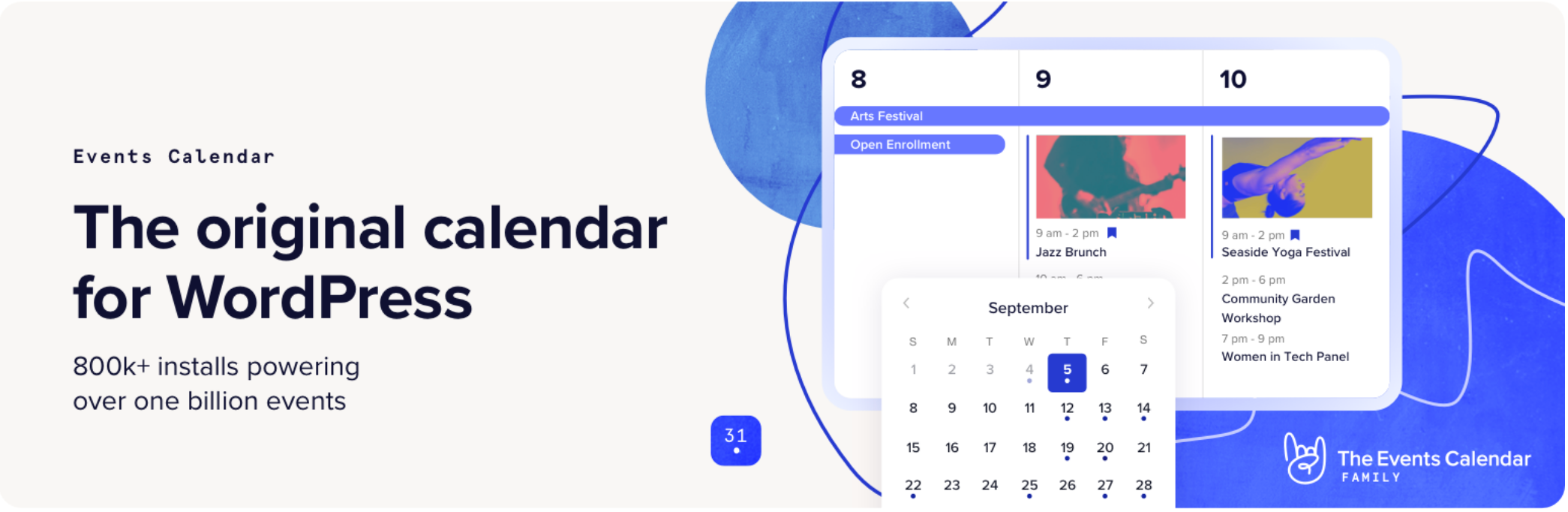
The Events Calendar is the most popular events plugin for WordPress, with over 600,000 active installs and a 4.2/5 rating from more than 2,400 reviews. It’s made by StellarWP (the team behind LearnDash and GiveWP) and works well for everyone from local clubs to universities.
The free version already gives you a lot: month, list, and day views, venues and organizers with Google Maps, event search, and iCal and Google Calendar export. It also adds event schema, so Google can understand your events better. Pair it with the free Event Tickets plugin and you can collect RSVPs and sell basic tickets too.
The paid plans are now sold through Liquid Web as bundled tiers. They add more calendar views, recurring events, community event submissions, WooCommerce ticketing, QR tickets with a check-in app, and custom attendee forms. The top Elite tier also adds a seating map builder and email campaigns. The free plugin is actively maintained, with version 6.18.2 released in October 2026.
Features
-
Month, list, and day calendar views
-
Venues and organizers with Google Maps
-
Event search and filters
-
iCal and Google Calendar export
-
Event schema markup for SEO
-
RSVPs and tickets with the free Event Tickets plugin
-
Recurring events (Pro)
-
Community event submissions (Pro)
-
QR tickets and check-in app (Pro)
-
Seating map builder (Pro)
Pros
-
Huge user base and lots of tutorials
-
Solid free version
-
Big ecosystem of add-ons and integrations
-
Regular updates
Cons
-
Paid plans got much more expensive after the move to bundled tiers
-
Recurring events need a paid plan
-
Some users report slower support since the change
Pricing
The Events Calendar is free on WordPress.org. Paid plans are now sold by Liquid Web: Pro costs $399/year and Elite costs $599/year. There’s also a bundle with LearnDash, GiveWP, and Kadence from $350/year for one site. Refunds are available within 7 days of purchase.
2 Events Manager

Events Manager is one of the oldest event plugins for WordPress, and it’s still going strong. It has over 60,000 active installs and a 4.2/5 rating from more than 550 reviews.
What makes it stand out is how much you get for free. Recurring events, location maps, front-end event submission, and built-in bookings with capacity limits are all in the free version. That’s more than most competitors give away. You also get calendars, categories, tags, and iCal and RSS feeds.
Events Manager Pro adds online payments (PayPal, Stripe, Square, and more), coupons, custom booking forms, PDF tickets and invoices, QR check-in, and waitlists. The Pro Plus tier adds reserved seating and a mobile app. The plugin is updated often, with version 7.4.12 released in October 2026.
Features
-
Recurring events
-
Bookings with capacity limits
-
Locations with Google Maps
-
Front-end event submission
-
Calendars, categories, and tags
-
iCal and RSS feeds
-
Stripe, PayPal, and Square payments (Pro)
-
Coupons and custom booking forms (Pro)
-
PDF tickets and QR check-in (Pro)
-
Reserved seating and mobile app (Pro)
Pros
-
Very generous free version
-
Recurring events and bookings without paying
-
Flexible templates and shortcodes
-
Each license includes two extra staging sites
Cons
-
Admin interface feels dated
-
No refunds on Pro
-
Takes some work to make it look modern
Pricing
Events Manager is free on WordPress.org. Pro costs $129/year for one site at the regular price ($89 during the current sale), and Pro Plus costs $169/year for one site ($109 on sale). Licenses for 3, 5, 10, and unlimited sites are also available. The developer does not offer refunds.
3 EventON

EventON is a premium event calendar known for its clean, modern look. It has over 52,000 sales on CodeCanyon with a 4.4/5 rating from about 2,100 buyers. There’s also a free EventON Lite version on WordPress.org.
Instead of a plain grid, EventON shows events as stylish cards that open up when clicked, with images, maps, and details all in one place. It’s a great fit if your calendar sits on your homepage and you want it to look good without custom design work.
The full version adds grid, weekly, and yearly views, an EventCard designer, advanced filters, multilingual events, and Zoom integration. Bigger features like tickets, RSVP, and seating are separate paid add-ons. The latest full version is 5.1.1, released in October 2026.
Features
-
Expandable event cards with images and maps
-
Month, schedule, and tile views
-
Repeating and virtual events
-
Google Calendar and ICS export
-
Event schema markup
-
Grid, weekly, and yearly views (Pro)
-
EventCard and EventTop designers (Pro)
-
Advanced search and filters (Pro)
-
Tickets, RSVP, and seating (paid add-ons)
Pros
-
Beautiful, modern calendar design
-
Low one-time price for the core plugin
-
Lifetime updates for the core plugin
-
Big add-on library
Cons
-
Tickets, RSVP, and many views cost extra
-
Add-on subscriptions add up quickly
-
The free Lite version is fairly basic
Pricing
EventON Lite is free on WordPress.org. The full version costs $60 one-time for one site on the official site, with lifetime updates and 1 year of support. It’s also sold on CodeCanyon. Add-ons are yearly subscriptions, for example Event Tickets costs $120/year and RSVP Events costs $100/year. The official store has a 30-day refund policy.
4 Eventin
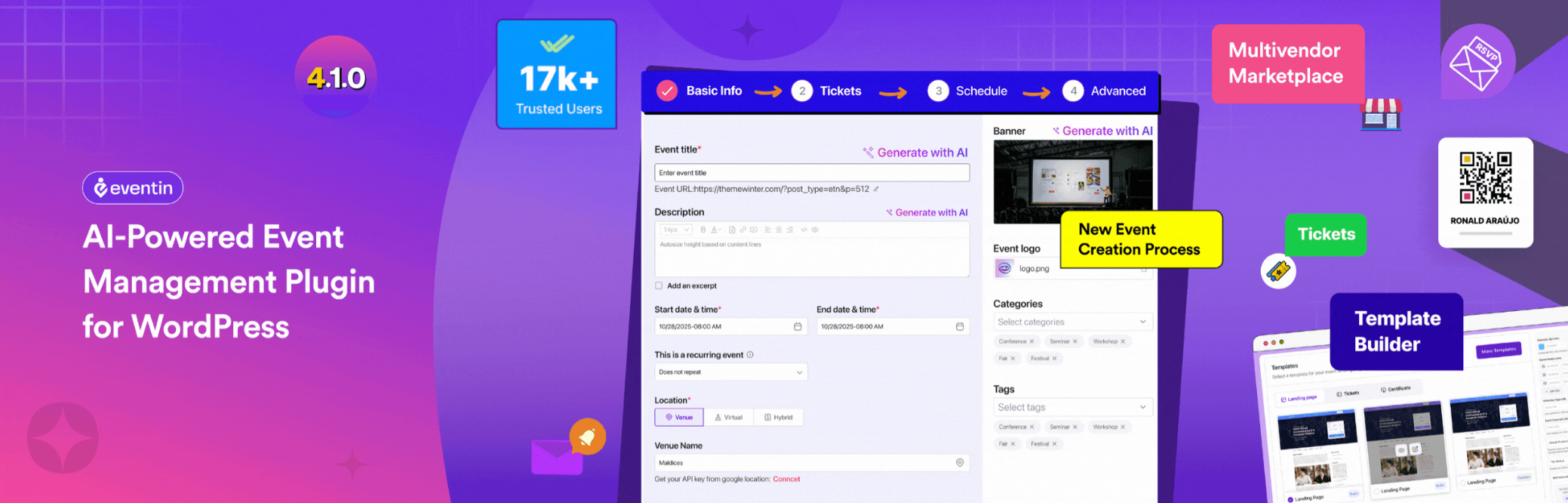
Eventin by Themewinter is an all-in-one event plugin for selling tickets and running both in-person and online events. It has over 10,000 active installs and one of the best ratings on this list: 4.7/5 from more than 410 reviews.
Even the free version can do a lot. You get unlimited events, recurring events, multiple ticket tiers, WooCommerce payments, and PDF tickets with QR codes. It also connects with Zoom and Google Meet, and lets you add speakers and schedules, which is handy for conferences.
Eventin Pro adds RSVP, a seat map, ticket and certificate builders, extra attendee fields, and integrations with FluentCRM, Dokan, and BuddyBoss. It’s updated very often, with version 4.1.29 released in late October 2026.
Features
-
Unlimited single and recurring events
-
Multiple ticket tiers
-
WooCommerce payments
-
PDF tickets with QR codes
-
Zoom and Google Meet integration
-
Speakers and schedules
-
Seat map (Pro)
-
RSVP and invites (Pro)
-
Ticket and certificate builders (Pro)
-
FluentCRM, Dokan, and BuddyBoss integrations (Pro)
Pros
-
Excellent rating on WordPress.org
-
Strong ticketing in the free version
-
Great for conferences and virtual events
-
Lifetime plans available
Cons
-
Free and Pro feature lists can be confusing
-
Short 15-day refund window
-
Prices lean on big “sale” discounts
Pricing
Eventin has a free version on WordPress.org. Pro costs $69/year for 2 sites (Standard), $139/year for 10 sites (Premium), and $239/year for unlimited sites (Agency). Lifetime plans start at $119 for one site. These are current sale prices. There’s a 15-day money-back guarantee.
5 Sugar Calendar
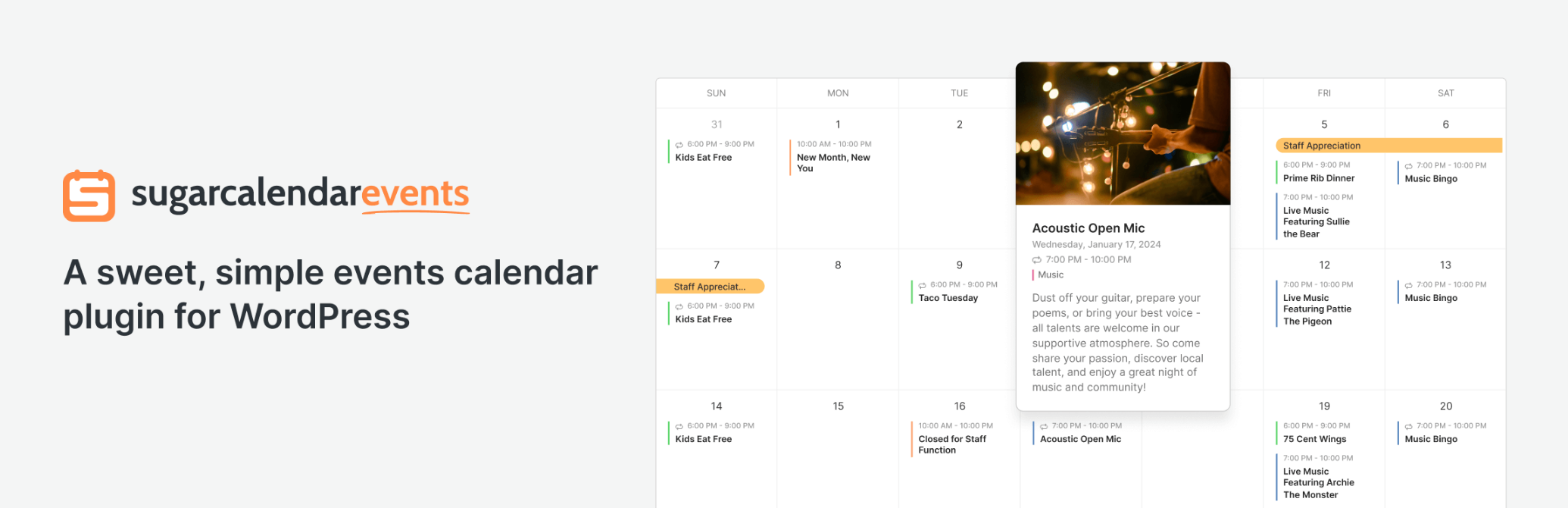
Sugar Calendar is a lightweight event calendar that focuses on doing the basics well. It has over 10,000 active installs and a 4.5/5 rating on WordPress.org.
It’s a great pick if you want a fast, clean calendar without the bloat of bigger plugins. You can create events, show them in month, week, and day views, and even sell simple tickets with Stripe in the free Lite version. Just keep in mind that Lite adds a 3% fee to each ticket order, on top of Stripe’s own fees.
Paid plans add automated recurring events, registration forms, RSVPs, front-end event submission, calendar imports from Google, Apple, and Outlook, and Zapier. The Plus plan and up also remove the 3% ticket fee and add multiple ticket types and WooCommerce checkout. Version 3.16.0 came out in October 2026.
Features
-
Month, week, and day calendar views
-
Fast, lightweight code
-
Stripe ticket sales
-
Basic attendee tracking
-
Automated recurring events (Pro)
-
Registration forms and RSVPs (Pro)
-
Multiple ticket types with no 3% fee (Pro)
-
Calendar import from Google, Apple, and Outlook (Pro)
-
Zapier integration (Pro)
Pros
-
Clean, lightweight, and easy to use
-
Sell tickets even on the free version
-
14-day no-questions-asked refund
Cons
-
3% ticket fee on the Lite and Basic plans
-
Fewer design options than competitors
-
Intro prices double at renewal
Pricing
Sugar Calendar Lite is free. Paid plans currently have a 50% intro discount for the first year: Basic $49.50 and Plus $99.50 (1 site each), Pro $199.50 (3 sites), and Elite $299.50 (10 sites). Renewals are at full price ($99 to $599/year). Refunds are available within 14 days.
6 Eventonomy
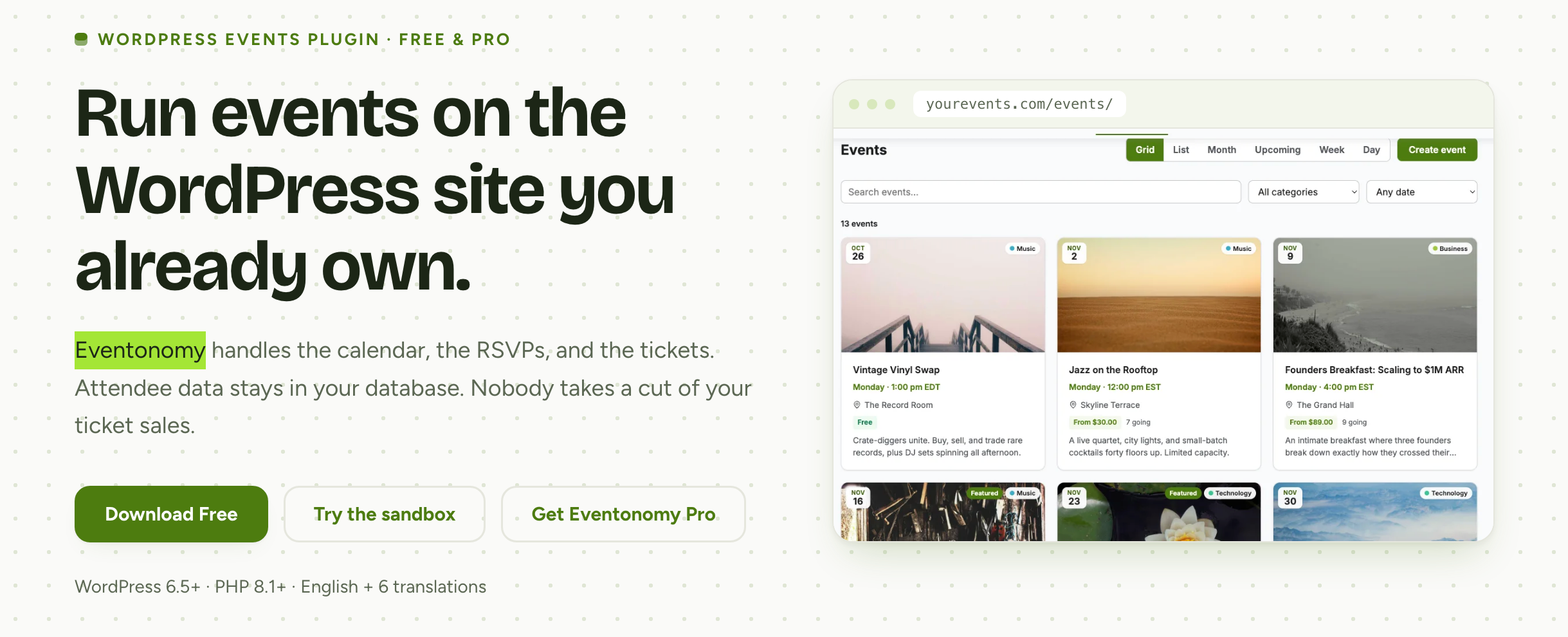
Eventonomy is a newer event plugin from Wbcom Designs, launched in July 2026. It’s built for community websites, clubs, and organizations where members create and manage their own events, right from the front end of your site.
The free version is very generous. You get unlimited events, recurring event series, four calendar views (grid, list, month, and upcoming), and built-in RSVPs with automatic waitlists. Visitors can answer Going, Maybe, or No, and guests can RSVP without creating an account. You can also set capacity limits and ask custom RSVP questions.
You also get front-end event submission, a member dashboard, shared venues and organizers, ICS calendar feeds, and blocks that match your theme’s styling. Events are stored in their own database tables, so your site stays fast as your calendar grows.
Eventonomy Pro adds paid ticket sales through Stripe, PayPal, and WooCommerce with no per-ticket platform fees, plus QR door check-in, reports, week and day views, maps, and SMS reminders. Version 1.9.1 came out in October 2026.
Features
-
Unlimited events and recurring event series
-
Grid, list, month, and upcoming calendar views
-
RSVPs with capacity limits and automatic waitlists
-
Guest RSVPs without an account
-
Custom RSVP questions and attendee exports
-
Front-end event submission and member dashboard
-
Shared venue and organizer catalog
-
ICS calendar feeds and add-to-calendar buttons
-
Paid tickets with Stripe, PayPal, and WooCommerce (Pro)
-
QR door check-in and reports (Pro)
-
Week and day views, maps, and SMS reminders (Pro)
Pros
-
Generous free version with unlimited events and RSVPs
-
Recurring events and waitlists included for free
-
Members can submit and manage events from the front end
-
No per-ticket platform fees, even on Pro
-
Stays fast as your calendar grows
Cons
-
Paid ticket sales need the Pro version
-
Week and day views and reports are Pro only
-
Newer plugin with a smaller user base than older competitors
Pricing
Eventonomy is free, with no license key needed. Pro costs $99/year for one site (Personal), $199/year for 5 sites (Professional), and $249/year for unlimited sites (Agency). Lifetime licenses start at $249 for one site. Every Pro plan includes all Pro features, and there’s a 30-day money-back guarantee.
7 EventPrime

EventPrime by Metagauss is a full event management plugin with calendars, bookings, and tickets built in. It has over 7,000 active installs and a 4.4/5 rating from 85 reviews.
The free version covers a lot of ground: multi-day and recurring events, month, week, day, and agenda views, ticket types, a bookings manager, and pages for venues, performers, and organizers. Attendees also get a front-end area where they can see their bookings.
Premium extensions add Stripe and Square payments, coupons, invoices, live seating, Zoom, RSVP, waiting lists, attendee check-in, and certificates. You can buy single extensions or get them in bundles. Version 4.3.6.1 came out in late October 2026.
Features
-
Multi-day and recurring events
-
Month, week, day, and agenda views
-
Ticket types and categories
-
Bookings manager
-
Venues, performers, and organizers
-
Front-end user area
-
Stripe and Square payments (Pro)
-
Coupons and invoices (Pro)
-
Live seating and Zoom (Pro)
-
RSVP, waiting list, and check-in (Pro)
Pros
-
Lots of features in the free version
-
Affordable bundles
-
Buy only the extensions you need
Cons
-
Smaller user base
-
Refunds only within 24 hours of purchase
-
Pricing pages can be confusing
Pricing
EventPrime is free on WordPress.org. The Essential bundle costs $69 for one site ($129 for unlimited sites) and Professional costs $99 for one site ($189 for unlimited sites), each with 1 year of updates. Single extensions cost $29.95 to $49.95. Refunds are only available within 24 hours of purchase.
8 WP Event Manager

WP Event Manager is a lightweight plugin built for event listing websites, where visitors or organizers can submit their own events. It has over 20,000 active installs and a 4.0/5 rating from about 250 reviews.
The free core gives you event listings in box or list view, search with filters, a front-end submission form, event types and categories, and a field editor to customize the form. It’s a good base for a local events directory or a community site.
Most other features come as paid add-ons, including the calendar view, recurring events, ticket sales, attendee registration, Zoom, and CRM integrations. The latest version is 3.4.1, released in July 2026.
Features
-
Event listings in box and list view
-
Search with filters
-
Front-end event submission
-
Event types and categories
-
Form field editor
-
40 translations and RTL support
-
Calendar and recurring events (Pro)
-
Ticket sales and registrations (Pro)
-
Zoom, speakers, and schedules (Pro)
-
CRM and email marketing integrations (Pro)
Pros
-
Great for user-submitted events
-
Clean, lightweight core
-
Huge add-on catalog
Cons
-
Even the calendar view is a paid add-on
-
No refunds
-
Mixed reviews on WordPress.org
Pricing
WP Event Manager is free on WordPress.org. Paid bundles are yearly and start at $99/year (Event Manager Plus), $199/year (Event Manager Pro with ticket selling), $299/year (Virtual Event Manager Pro), and $399/year (All Events Manager Pro) for one site. These are current sale prices. The company does not offer refunds.
9 Amelia

Not quite the same thing, but useful: Amelia is mainly an appointment booking plugin, but it also has a solid events module. It has over 90,000 active installs and a 4.6/5 rating from about 790 reviews.
This makes it a great pick if you run both appointments and events, like a yoga studio that books private sessions and also hosts group workshops. You manage everything from one dashboard, and the free Lite version already lets you publish basic events, including multi-day events.
Paid plans add ticket types with dynamic pricing, deposits, coupons, QR e-tickets with check-in, waiting lists, recurring events, Zoom, Google Meet, and Teams links, and SMS and WhatsApp reminders. Version 2.4.14 came out in October 2026.
Features
-
Events and appointments in one plugin
-
Multi-day events
-
Events list booking form
-
Ticket types and dynamic pricing (Pro)
-
Deposits and coupons (Pro)
-
QR e-tickets and check-in (Pro)
-
Waiting lists and recurring events (Pro)
-
Zoom, Google Meet, and Teams (Pro)
-
Email, SMS, and WhatsApp reminders (Pro)
Pros
-
Handles appointments and events together
-
Polished, modern booking forms
-
Large user base and high rating
Cons
-
Events are a secondary feature
-
The Starter plan only supports Square payments
-
Advertised prices are first-year discounts
Pricing
Amelia Lite is free on WordPress.org. Events are included in all paid plans. Pro is listed from $149 for the first year (regular $199), Elite from $259, and lifetime licenses start at $349. PayPal and Stripe need the Standard plan or higher. Renewals are at the regular price, and there’s a 15-day money-back guarantee.
How To Choose a WordPress Event Calendar Plugin
The right plugin depends on what kind of events you run and how people sign up. Here’s what to check before you pick one.
Type of events. For simple listings of public events, The Events Calendar or Sugar Calendar is plenty. Conferences and virtual events need speakers, schedules, and Zoom links, which Eventin handles well.
Tickets and payments. If you sell tickets, check which payment gateways are included and whether there are extra fees. Eventin and EventPrime include ticketing for free, while Sugar Calendar Lite charges a 3% fee per order.
Recurring events. Weekly classes and monthly meetups need recurring events. Events Manager, Eventin, EventPrime, and Eventonomy include them for free, while The Events Calendar needs a paid plan.
Who adds the events. If you want organizers or visitors to submit events, look for front-end submission. WP Event Manager is built for this, while Events Manager and Eventonomy include it for free. Eventonomy is also a great fit for clubs and communities where members run their own events.
Design. Your calendar is often one of the most visited pages on your site, so it should look good. EventON is the best choice if design matters most.
Appointments too. If you also book one-on-one sessions, Amelia saves you from running two separate plugins.
Pricing and refunds. Watch out for intro prices that double at renewal, and check the refund policy. Events Manager and WP Event Manager don’t offer refunds, and EventPrime only gives you 24 hours.
FAQs About WordPress Event Calendar Plugins
What is the best free event calendar plugin for WordPress?
The Events Calendar is the most popular free option, with over 600,000 installs. If you need recurring events and bookings for free, Events Manager is the most generous.
Can I sell event tickets with a WordPress plugin?
Yes. Eventin, EventPrime, and Events Manager all support ticket sales. Sugar Calendar Lite lets you sell tickets with Stripe for a 3% fee, and The Events Calendar works with the free Event Tickets plugin.
Do I need WooCommerce to sell event tickets?
Not always. Events Manager Pro, Sugar Calendar, and EventPrime have their own payment options. Eventin’s free version uses WooCommerce for payments.
What’s the difference between an event calendar plugin and a booking plugin?
An event calendar shows events with fixed dates that many people attend, like a concert or a class. A booking plugin lets people pick a time slot with you or your staff, like a consultation. Amelia does both.
Can I add virtual events to my calendar?
Yes. Eventin, EventPrime, and Amelia connect with Zoom, and EventON supports virtual events even in its free Lite version. The Events Calendar supports virtual and hybrid events in its paid plans.
Will an event calendar plugin help my SEO?
It can. The Events Calendar and EventON add event schema markup, which helps Google understand your events and show them in search results.
Conclusion
The best WordPress event calendar plugin depends on the kind of events you run and your budget. Here are our quick picks:
- Best overall: The Events Calendar
- Best free option: Events Manager
- Best design: EventON
- Best for selling tickets: Eventin
- Best for community events: Eventonomy
- Best for events and appointments: Amelia
Building a full events website? Check out our list of the best event WordPress themes. And if you also take one-on-one bookings, see our picks for the best WordPress booking plugins.

Leave a Reply