

Your website can tell visitors how great your product or service is. But people trust other customers much more than they trust you. That is why testimonials are one of the easiest ways to turn a visitor into a buyer.
The problem is that WordPress does not have a proper way to manage testimonials. Most people end up pasting quotes into a text block, which is hard to update, looks plain, and does nothing for search results.
A testimonial plugin fixes that. It gives you one place to store testimonials, a form to collect new ones, and nice layouts like sliders and grids to show them. The better ones also add star ratings and review schema, so your ratings can show up in Google.
Keep in mind that a testimonial plugin is not the same as a general slider plugin. A slider plugin can rotate any content, but it will not collect, approve, or rate testimonials for you. (If you just need sliders, check out our list of the best WordPress slider plugins.)
In this post, we’ve picked the 8 best WordPress testimonial plugins. Some are free, some are premium, and most give you both options. Let’s dive in.
|
# |
PLUGIN |
FREE VERSION |
RATING |
DETAILS |
|---|---|---|---|---|
|
1 |
Strong Testimonials ★ Best overall |
✓ Yes |
★ 4.8/5 WordPress.org · 80K+ installs | |
|
2 |
Real Testimonials ★ Best for video testimonials |
✓ Yes |
★ 4.7/5 WordPress.org · 40K+ installs | |
|
3 |
WP Social Ninja ★ Best for review platforms |
✓ Yes |
★ 4.8/5 WordPress.org · 30K+ installs | |
|
4 |
Testimonial Slider and Showcase ★ Best budget pick |
✓ Yes |
★ 4.6/5 WordPress.org · 20K+ installs | |
|
5 |
Thrive Ovation ★ Best for capturing testimonials |
Premium only |
No public rating Thrive Themes | |
|
6 |
Site Reviews ★ Best for on-site reviews |
✓ Yes |
★ 4.9/5 WordPress.org · 60K+ installs | |
|
7 |
Solid Testimonials |
✓ Yes |
★ 4.3/5 WordPress.org · 1K+ installs | |
|
8 |
Widgets for Google Reviews ★ Best for Google reviews |
✓ Yes |
★ 4.9/5 WordPress.org · 1M+ installs |
Ratings from WordPress.org unless noted. Checked November 2026.
1 Strong Testimonials

Strong Testimonials is the most popular free testimonial plugin for WordPress. It has over 80,000 active installs and a 4.8 out of 5 rating from 614 reviews on WordPress.org. It works well for small businesses, freelancers, agencies, and anyone who wants a simple way to collect and show customer feedback.
What makes it stand out is how much you get for free. You can build a testimonial submission form, approve new entries before they go live, and show them as a grid, list, or slideshow using its views builder. There is no limit on how many views you create, and it works with WPML and Polylang for multilingual sites.
The paid extensions add review markup for search results, an importer that pulls reviews from Google, Facebook, Yelp, and WooCommerce, extra form fields, multiple forms, and category filters. The plugin is very active, with version 3.3.17 released in November 2026.
Features
-
Front-end testimonial submission form
-
Moderation before testimonials go live
-
Unlimited display views (grid, list, slideshow)
-
Star ratings with average rating shortcode
-
Drag and drop ordering
-
WPML and Polylang support
-
Review markup for search results (Pro)
-
Import reviews from Google, Facebook, Yelp and WooCommerce (Pro)
-
Multiple forms and custom fields (Pro)
Pros
-
Very generous free version
-
Large user base and frequent updates
-
Easy views builder for display and forms
-
Lifetime license option
Cons
-
The cheapest Pro plan adds very little
-
Review markup and importer need the Plus plan or higher
-
Some users report slow support replies
Pricing
Strong Testimonials is free on WordPress.org. Pro plans are Basic at $78/year for 1 site, Plus at $138/year for 3 sites, and Business at $198/year for 5 sites (first-year discounts were running when we checked). Lifetime plans cost $273, $483, and $693. Annual plans come with a 14-day refund window, while lifetime plans are non-refundable.
2 Real Testimonials

Real Testimonials (formerly Testimonial Pro) is made by ShapedPlugin. The free version has more than 40,000 active installs and a 4.7 out of 5 rating from 226 reviews. It is a great choice if you care about design and want your testimonials to look polished without writing CSS.
Even the free version gives you slider, grid, carousel, and list layouts, a front-end submission form, schema markup, and CSV import and export. Everything is managed from a shortcode generator with live settings, and there is a Gutenberg block too.
Pro is where it gets really interesting. You can collect video testimonials (customers can even record them), play them in a popup or inline, add unlimited custom fields, filter by group or star rating, and show an average rating. Version 4.1.1 came out in November 2026.
Features
-
Slider, grid, carousel and list layouts
-
Front-end submission form
-
Schema markup for testimonials
-
CSV import and export
-
Gutenberg block and shortcode generator
-
Video testimonials with recording (Pro)
-
8 layouts and 14 themes (Pro)
-
Unlimited custom form fields (Pro)
-
Ajax live filter and search (Pro)
-
reCAPTCHA spam protection (Pro)
Pros
-
Beautiful layouts out of the box
-
Strong video testimonial features
-
Free version includes schema and a form
-
Lifetime plans available
Cons
-
Lifetime licenses are pricey
-
Lots of settings can feel overwhelming at first
-
Best design options are Pro only
Pricing
Real Testimonials has a free version on WordPress.org. Pro costs $49/year for 1 site, $99/year for 5 sites, or $199/year for unlimited sites. Lifetime licenses cost $298, $498, and $798. There is a 14-day no-questions-asked refund policy.
3 WP Social Ninja

WP Social Ninja is a social proof plugin from WPManageNinja, the team behind Fluent Forms. It has over 30,000 active installs and a 4.8 out of 5 rating on WordPress.org. It is not only a testimonial plugin: it also shows social feeds and chat widgets, which makes it a good all-in-one pick.
The free version can pull your reviews from Google and Airbnb and show them with ready-made templates that update automatically. That is perfect if your best feedback already lives on your Google Business Profile.
With Pro, you get reviews from Facebook, Yelp, Tripadvisor, Booking.com, WooCommerce, and more, plus custom reviews you can add or import yourself, a testimonial widget, a write a review button with QR codes, schema snippets, and review notification popups.
Features
-
Google and Airbnb reviews in the free version
-
Auto-sync for new reviews
-
Ready-made review templates
-
Shortcodes and page builder support
-
Facebook, Yelp, Tripadvisor and Booking.com reviews (Pro)
-
Custom reviews and testimonial widget (Pro)
-
Review collection with a button and QR code (Pro)
-
Schema snippets and notification popups (Pro)
-
Social feeds and chat widgets (Pro)
Pros
-
Combines testimonials, reviews, feeds and chat
-
Pulls reviews from many platforms
-
Lifetime deals available
-
Clean, modern templates
Cons
-
Custom testimonials are a Pro feature
-
Can be more than you need for a simple slider
-
Plan names and limits are a bit confusing on the site
Pricing
WP Social Ninja has a free version on WordPress.org. Pro costs $89/year for 1 site, $249/year for 25 sites, or $399/year for unlimited sites. Lifetime plans are $349, $599, and $749. A 20% discount was running when we checked.
4 Testimonial Slider and Showcase

Testimonial Slider and Showcase is made by RadiusTheme. It has more than 20,000 active installs and a 4.6 out of 5 rating on WordPress.org. If you mostly want a good looking testimonial slider or grid at a low price, this is the one to check.
The free version comes with grid and slider layouts, unlimited shortcodes, star ratings, and style options for colors and fonts. It works with Gutenberg and Elementor and supports RTL languages.
The Pro version unlocks more than 30 layouts, including isotope filter and masonry designs, video testimonials from YouTube and Vimeo, front-end submission, Ajax pagination, and filters by category or tag. Version 3.0.2 was released in October 2026.
Features
-
Grid and slider layouts
-
Unlimited shortcodes
-
Star ratings
-
Color and typography controls
-
Gutenberg and Elementor support
-
30+ layouts including isotope and masonry (Pro)
-
YouTube and Vimeo video testimonials (Pro)
-
Front-end submission form (Pro)
-
Category, tag and ID filters (Pro)
Pros
-
Cheapest Pro plan on this list
-
30-day refund policy
-
Lots of layouts in Pro
-
Lifetime option
Cons
-
Free version has only a few layouts
-
No submission form in the free version
-
Smaller review count than the leaders
Pricing
Testimonial Slider and Showcase is free on WordPress.org. Pro costs $29/year for 1 site, $75/year for 5 sites, or $149/year for unlimited sites. Lifetime plans are $99, $199, and $299. RadiusTheme offers a 30-day refund.
5 Thrive Ovation

Thrive Ovation is a premium testimonial plugin from Thrive Themes. Instead of focusing only on display, it focuses on getting more testimonials in the first place. It is a good fit for course creators, coaches, and marketers who already use Thrive tools.
Its best trick is turning blog comments into testimonials with one click, pulling in the person’s name and photo. You can also capture testimonials with forms on landing pages and send automated requests, then store everything in one central library with tags and statuses.
On the display side, you get grid, slider, and single testimonial templates, and you can show testimonials based on tags. If you use Thrive Architect, you can design them in much more detail.
Features
-
Turn WordPress comments into testimonials
-
Testimonial capture forms
-
Automated testimonial requests
-
Approval emails for permission to publish
-
Central testimonial library with tags
-
Tag-based dynamic display
-
Grid, slider and single templates
-
Deep styling with Thrive Architect
Pros
-
Great for collecting new testimonials
-
Clean testimonial library
-
Works nicely with other Thrive plugins
-
30-day money-back guarantee
Cons
-
No free version
-
Renewal price is double the intro price
-
No imports from Google or other review sites
Pricing
Thrive Ovation is premium only. It costs $99/year for 1 site (it was on sale for $49 for the first year when we checked). It is also included in Thrive Suite, which costs $599/year for 5 sites ($299 for the first year). Thrive Themes offers a 30-day money-back guarantee.
6 Site Reviews

Site Reviews lets visitors leave reviews and ratings directly on your website. It has more than 60,000 active installs and a 4.9 out of 5 rating from 378 reviews. It is a great pick if you want testimonials that come with star ratings and rich snippets.
The free version is very complete. You get a review form, moderation, spam protection with a honeypot, CAPTCHA and Akismet, JSON-LD schema, rating summaries, and CSV import and export. You can assign reviews to posts, pages, or users, so it also works for directories and service pages.
The premium add-ons add custom form fields, image uploads, review filters, front-end editing, and a theme designer for carousels and grids. Version 8.3.7 came out at the end of October 2026.
Features
-
Front-end review form with star ratings
-
Moderation and email notifications
-
Spam protection (honeypot, CAPTCHA, Akismet)
-
JSON-LD schema and rating summaries
-
Assign reviews to posts, pages or users
-
CSV import and export
-
Blocks, shortcodes and page builder elements
-
Custom form fields and image uploads (Premium)
-
Carousel and grid designer (Premium)
Pros
-
Excellent free version
-
Top rating on WordPress.org
-
Strong spam protection
-
Add-ons keep working after the license ends
Cons
-
Looks plain without the Themes add-on
-
No imports from Google or other platforms
-
Prices are in euros and there is no lifetime plan
Pricing
Site Reviews is free on WordPress.org. Site Reviews Premium, which includes all add-ons, costs €89/year for 1 site, €179/year for 3 sites, or €289/year for 6 sites. There is a 14-day refund policy.
7 Solid Testimonials

Solid Testimonials (formerly GS Testimonial Slider) is made by GS Plugins. It is smaller than the other picks, with over 1,000 active installs and a 4.3 out of 5 rating on WordPress.org, but it is actively maintained, with an update in November 2026.
It has a handy shortcode builder with a live preview, so you can see your slider or grid while you set it up. You can also set columns for desktop, tablet, and mobile separately, and filter testimonials by category or tag.
The Pro version adds masonry and filterable layouts, more than 16 extra designs including popup and video popup sliders, image shapes, a grayscale effect, and drag and drop ordering.
Features
-
Grid and carousel layouts
-
Shortcode builder with live preview
-
Different columns per device
-
Star ratings and social icons
-
Category and tag filters
-
Import and export
-
Masonry and filterable layouts (Pro)
-
16+ extra designs with video popups (Pro)
-
Drag and drop ordering (Pro)
Pros
-
Live preview makes setup easy
-
Good responsive controls
-
Regular updates
Cons
-
Small user base
-
Strict 7-day refund policy
-
Fewer features than the leaders
Pricing
Solid Testimonials has a free version on WordPress.org. Pro costs $49/year for 1 site, $99/year for 5 sites, or $199/year for 25 sites.
8 Widgets for Google Reviews
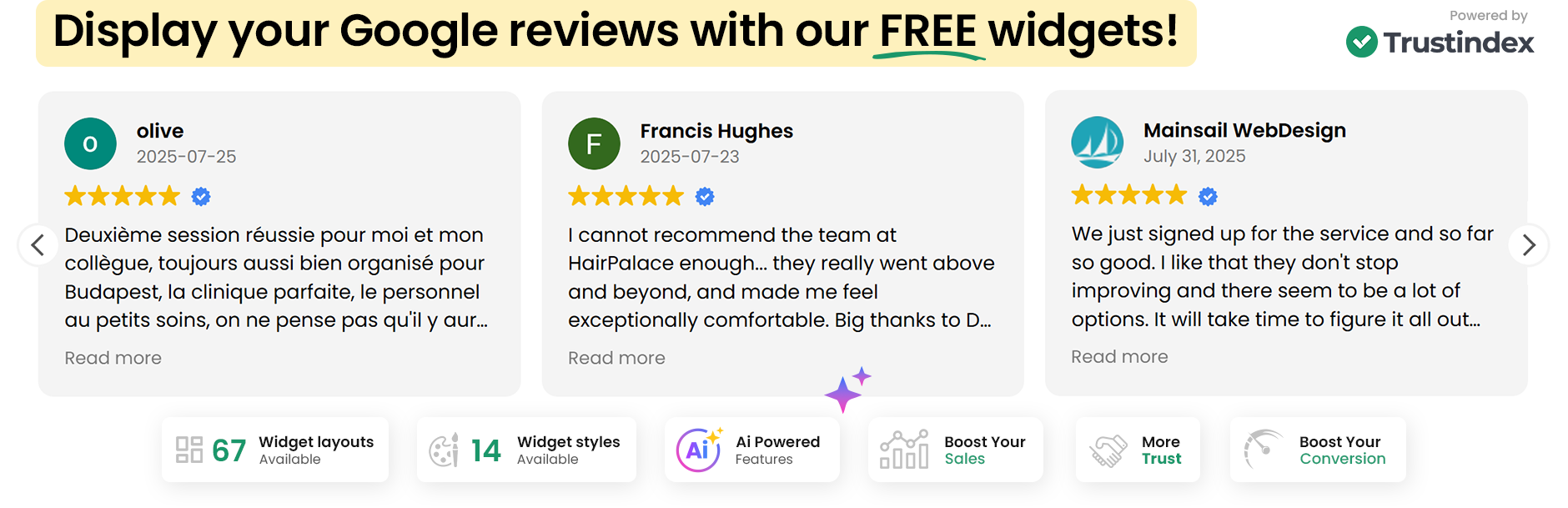
Quick note: Widgets for Google Reviews by Trustindex is not a classic testimonial plugin. It does not store testimonials you write yourself. Instead, it shows your real Google reviews on your site, which many businesses use as their testimonial section. With over 1 million active installs and a 4.9 out of 5 rating from 2,669 reviews, it is the most popular plugin on this list.
The free version connects one Google profile and shows up to 10 reviews in one widget, with dozens of layouts and styles. Reviews from Google feel more trustworthy to visitors because they come from a third party.
The paid plans add more than 130 review platforms, unlimited widgets and reviews, automatic updates, rich snippets, AI review summaries, and review invitations. Version 14.3 was released in October 2026.
Features
-
Show Google reviews on your site
-
Dozens of widget layouts and styles
-
Slider, grid and badge widgets
-
Mobile friendly design
-
130+ review platforms (paid)
-
Unlimited widgets and reviews (paid)
-
Automatic review updates (paid)
-
Rich snippets and AI summaries (paid)
Pros
-
Huge user base and top rating
-
Real third-party reviews build trust
-
Very quick to set up
Cons
-
Free version is limited to 10 reviews and manual refresh
-
Paid plans are a subscription to an outside service
-
Not for testimonials you collect yourself
Pricing
Widgets for Google Reviews is free on WordPress.org. Trustindex paid plans start at about $65/year for 1 domain, $125/year for 5 domains, and $349/year for the Ultimate plan.
How To Choose a WordPress Testimonial Plugin
The right plugin depends on where your testimonials come from and how you want to show them. Here’s what to check before you pick one.
Where your testimonials come from. If customers send you feedback by email or you collect it on your site, pick a plugin with a submission form like Strong Testimonials, Real Testimonials, or Site Reviews. If your best reviews are already on Google, Widgets for Google Reviews or WP Social Ninja will save you time.
Collecting new testimonials. Most people forget to ask. Thrive Ovation and WP Social Ninja Pro help you request and capture testimonials, which keeps your social proof fresh.
Display options. Check which layouts you get for free. Testimonial Slider and Showcase and Real Testimonials have the most layouts, while Solid Testimonials gives you a live preview as you design.
Star ratings and schema. If you want star ratings in search results, look for review schema. Site Reviews and Real Testimonials include it for free, while Strong Testimonials needs its Plus plan.
Video testimonials. Video feels more real than text. Real Testimonials Pro lets customers record videos, and Testimonial Slider and Showcase Pro can show YouTube and Vimeo testimonials.
Pricing model. Yearly licenses keep updates coming, but watch renewal prices. Strong Testimonials, Real Testimonials, Testimonial Slider and Showcase, and WP Social Ninja also offer lifetime plans if you prefer to pay once.
FAQs About WordPress Testimonial Plugins
Can I add testimonials to WordPress for free?
Yes. Strong Testimonials, Real Testimonials, Testimonial Slider and Showcase, Site Reviews, and Solid Testimonials all have free versions on WordPress.org. They cover the basics like a testimonial library, layouts, and star ratings. Advanced layouts, video testimonials, and imports usually need a paid plan.
What is the difference between testimonials and reviews?
Testimonials are usually hand-picked quotes from happy customers that you show on your site. Reviews are collected openly, often with star ratings, and can be positive or negative. Plugins like Site Reviews and WP Social Ninja handle reviews, while Strong Testimonials and Real Testimonials focus on testimonials.
Can testimonials help my SEO?
They can help a little. Some plugins add review schema, which can show star ratings for some page types in search results. Fresh testimonials also add useful, unique content to your pages. The bigger win is usually conversions, not rankings.
Can I show Google reviews as testimonials?
Yes. Widgets for Google Reviews shows your Google reviews for free (up to 10 reviews), and WP Social Ninja does the same in its free version. Strong Testimonials Plus can also import Google reviews into your testimonial library.
How do I collect testimonials from customers?
Add a testimonial submission form to a page and send the link to happy customers after a purchase or project. Strong Testimonials, Real Testimonials, and Site Reviews include forms in their free versions, and Thrive Ovation can automate testimonial requests.
Do I need a separate testimonial plugin if my page builder has a testimonial widget?
Not always. A page builder widget is fine for two or three static quotes. A dedicated plugin is better when you have many testimonials, want to collect them with a form, reuse them across pages, or add star ratings and schema.
Conclusion
The best WordPress testimonial plugin depends on where your testimonials come from and how you want to show them. Here are our quick picks:
- Best overall: Strong Testimonials
- Best for video testimonials: Real Testimonials
- Best for review platforms: WP Social Ninja
- Best budget pick: Testimonial Slider and Showcase
- Best for Google reviews: Widgets for Google Reviews
Want to get even more out of your happy customers? Check out our lists of the best WordPress social sharing plugins and the best WordPress form builder plugins.
Disclosure: This post contains affiliate links. That means if you make a purchase by following any of the affiliate links, we’ll get a small commission without any extra cost to you.

Leave a Reply